Feature Guide · Integrations
Four ways in.
One arrival workflow.
The right integration is the least complicated path that reliably tells the valet operation who is arriving and when. Valletto supports live OPERA Cloud, email, and file lanes today; direct API access remains a reviewed private preview.
Pick by source
Start with what the property can reliably produce.
A modern hotel may publish reservation events. Another may schedule a nightly email. A residential property may maintain a standing people roster. The integration should respect that reality, then normalize the result into an operating list instead of forcing every partner through the same technical door.
What it is
Live
OPERA Cloud
Bring hotel reservations into the valet workflow.
Live
Nightly email
A scheduled file sent to a private Reservation Inbox after a mapping has been proven.
Live
Spreadsheet roster
A person confirms the column mapping and imports dated reservations or standing people.
Private preview
Direct API
An access-controlled integration conversation, not a public endpoint or self-serve credential today.
Who uses it
Hotel IT and PMS teams typically own OPERA. Front desk or revenue operations may own the nightly report. Property managers often own a resident or employee spreadsheet. A software partner with a specific integration case can request a private API conversation. The valet team consumes the resulting arrivals rather than administering the source system.
The setup order
Define the stay arrangement first: dated hotel guests are different from a standing resident roster. Choose the source lane next. Prove identity, fields, and date semantics with sanitized sample data, then observe a complete cycle - new reservation, update, cancellation, check-in, and checkout where the source supports them - before depending on it operationally.
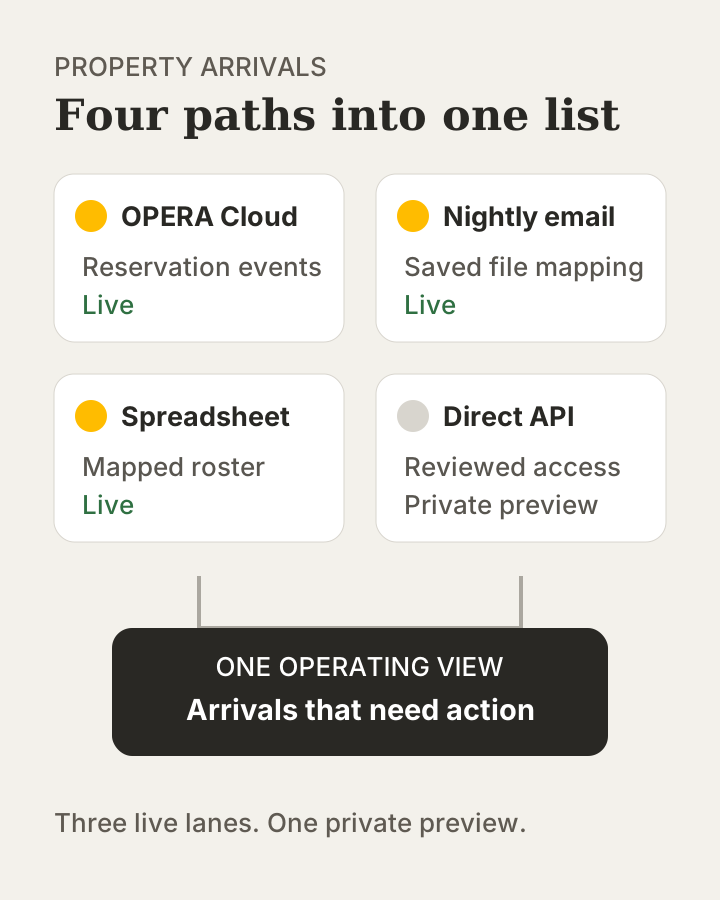
→The status labels reflect the current product: three live lanes and one access-controlled private preview.
The daily loop
OPERA can carry reservation lifecycle events such as new, update, cancel, check-in, checkout, no-show, room move, and rollback events. Email and spreadsheet lanes process discrete files, explain what was imported or refused, and rely on the property's chosen cadence. Every lane ultimately gives the property and valet team a list they can act on rather than another integration console to watch.
Availability depends on your property's hotel system and configuration. Confirm the requirements before arranging a connection.
The edge cases
A source can be technically connected and still carry incomplete data. Updates can arrive after a first import; cancellations and reversals must change the operating state rather than create another guest. Email can be rejected when the sender or attachment is wrong. Spreadsheet mappings must be re-proven when the export shape changes.
What it deliberately does not do
The public product does not advertise endpoints, issue public API credentials, or promise an SDK. It also does not claim live adapters for Mews, Cloudbeds, Apaleo, or StayNTouch today. OPERA folio write-back is designed work, not a shipped posting path; a person posts charges today.
What it connects to
Every arrival lane connects to a partner's stay arrangement, then to Parking and the valet's stay-aware check-in. OPERA details are grounded in Oracle's official Oracle integration information; Reservation Inbox and spreadsheet behavior are native Valletto workflows.
Next guide
Turn recognition into a membership.
Passport gives a regular one operator-owned membership across the locations that operator covers.
Concrete next step: write down which system owns the arrival truth, how often it changes, and who resolves exceptions.
