Feature Guide · Payroll
From approved time
to a number
A timesheet says someone worked 8.2 hours on Tuesday. A paycheck needs a dollar figure. Between those two things sits a rate model - whose hourly rate applies, whether a shift differential kicked in, whether a holiday multiplier fired - and that model is either boring and correct, or it's the thing you're fighting every other Friday. Here's how Valletto builds that number, and exactly where the line is between what it computes and what your payroll provider still does.
What it is
Payroll turns approved hours into a rate-composed number, per person, per period.
Time Cards (covered in its own guide) is where hours get approved. Payroll picks up from there: it takes every approved hour in a pay period, applies the rate rules that govern that person, and produces a per-employee total - straight time, overtime, tips - ready to hand to whoever actually cuts checks. It does not run in isolation from the rest of the roster: who someone is and what role they hold (covered in the Team and Roles guide) is part of how a rate resolves.
The person who lives in this screen is usually an owner or a controller, not a bookkeeper by trade - someone deciding whether Valletto's pay math can replace the spreadsheet they currently reconcile against ADP or Gusto by hand, or whether it just feeds those tools cleaner input.
Where rates live
Two ways to answer 'what does this person get paid,' and only one is on by default
The simple version: a rate on the profile
Every employee profile carries an hourly rate field, with an optional per-location override. That's the whole model until you turn on anything else.
By default, a person's pay rate is a single number on their profile - set once, editable any time from their record - with an optional table of per-location overrides for anyone who works different rates at different sites. For a small operation with flat rates and no shift differentials, this is the entire rate model, and there is nothing else to configure. Most companies start here.
The composed version: labor codes
Turn on the labor engine and rates stop being one field - they become a small set of rules that combine into an effective rate for each hour worked.
Base
Sets the hourly rate itself
A dollar amount per hour. Every person has a base - usually a private one auto-created just for them, functioning as their personal rate, editable with future-dated raises.
Additive
Adds or subtracts cents per hour
A shift differential - "night shift, +$2.00/hr" - that layers on top of whatever base is active for that hour.
Multiplier
Scales the effective rate
A holiday or weekend bump - "x1.5" - applied after the base and any additives are summed.
Label
Tags time, no pay effect
For attribution only - marking hours as a certain kind of work without changing what they're worth.
→A labor code isn't a job code or a cost center - it's a pay rule. Each one carries a condition (always, a time-of-day window, a day of week, a specific date, a location, a position) that decides when it fires, and a priority that breaks ties when more than one base could apply.
Setup order
Assign rates, then turn the engine on
Rates are assigned per person, not inherited from a role
The Pay rates screen is one People table: who, what role, what rate, what premiums apply to them, and a note when something needs attention.
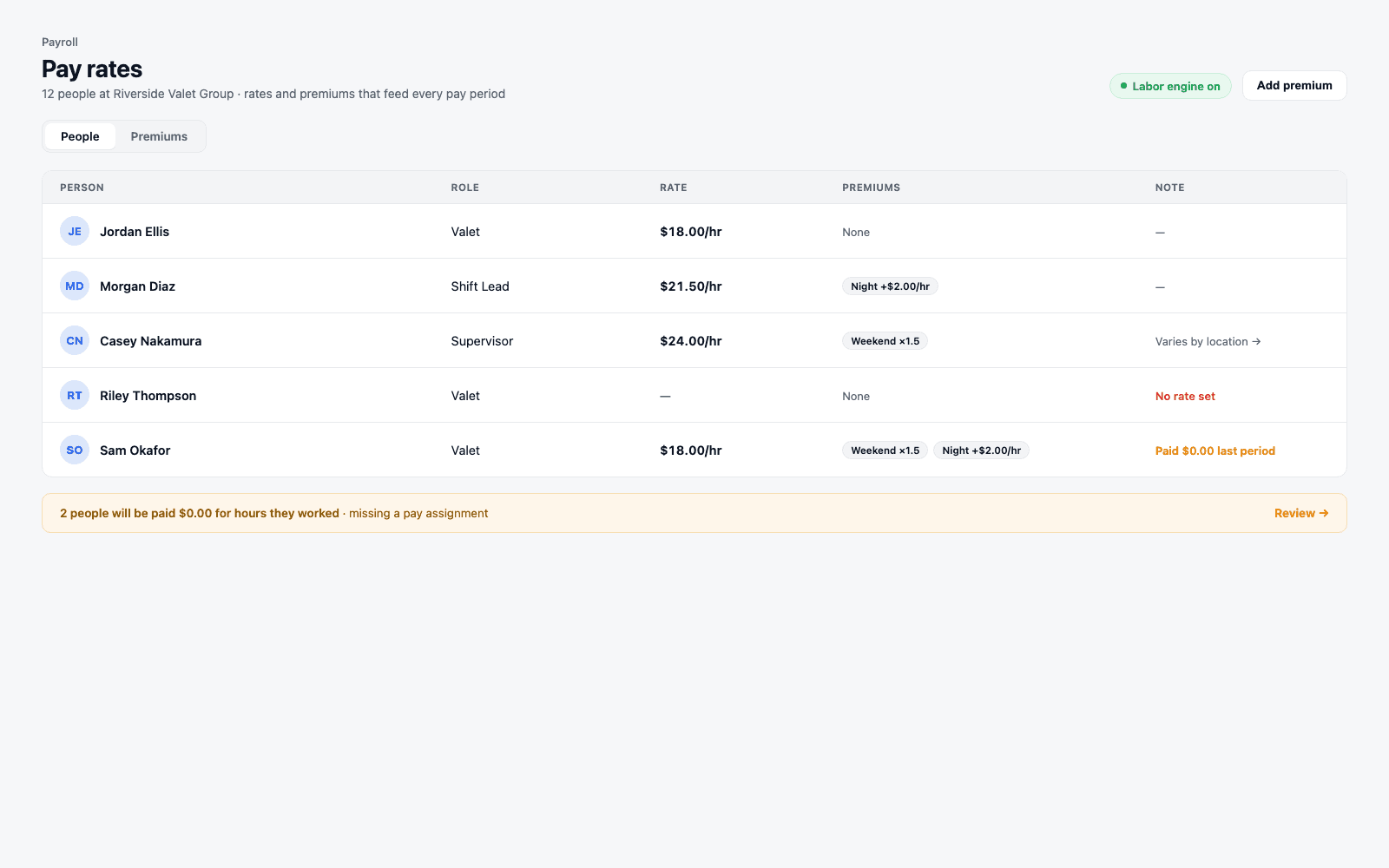
→Clicking a row opens that person's record with compensation already expanded - the rate lives next to everything else true of that person, not in a separate spreadsheet.
Turning on the labor engine is a company-wide, one-way decision
It's a single toggle, and it changes how pay is computed for everyone at the company at once - not per person, not per pay period.
Before you turn it on
Profile rate- One rate field per person, with location overrides
- Nothing to configure - works from day one
- No shift differentials or holiday multipliers
After you turn it on
Labor codes- Base + additive + multiplier codes compose per hour
- Differentials and premiums apply automatically
- Anyone without a rate assignment computes to $0.00
→The confirmation is explicit about the risk: turning it on changes pay computation for everyone immediately, and anyone without an assigned rate resolves to zero until they get one. There is deliberately no switch to turn it back off once you've moved a period's worth of pay through it - it's a migration, not a preference.
The daily loop
What happens at the end of a pay period
A period moves through readiness, approval, and pay - in that order
Before you can approve a period, Payroll checks a fixed list of conditions and tells you plainly which ones block you and which ones just warn.
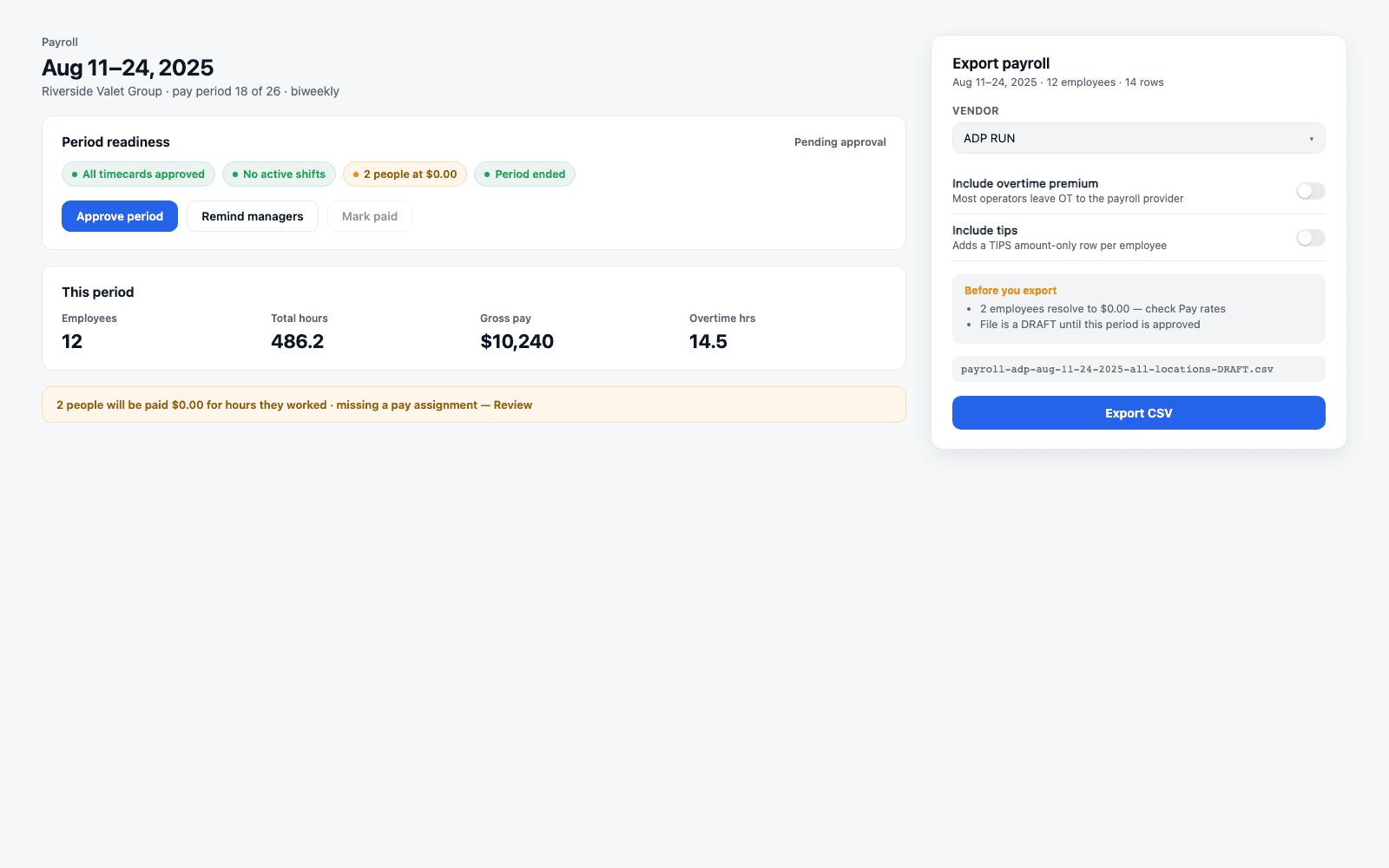
→Approving a period freezes an immutable record of exactly what was approved - every employee's earnings, broken into straight time, overtime, double time, and tips - so a later correction never rewrites history. Reopening a period is possible; overwriting what was approved is not.
Some readiness checks block the export outright - pending timecards, shifts still open, a period that hasn't ended yet. Others warn but let you through - someone resolving to $0.00 pay, a missing external payroll ID for one employee. The distinction matters: a hard block means the data isn't safe to export yet; a soft warning means it is, but you should look before you send it.
What comes out: hours and dollars, flattened for your provider
The export is a CSV, not a live sync - built for ADP RUN by name, and a generic format that covers Gusto, Paychex, QuickBooks, and Rippling.
Whatever labor codes composed a person's effective rate for a given block of hours, the export flattens it to one line: hours times a blended rate, because your payroll provider doesn't know Valletto's labor codes and shouldn't need to. Including overtime as a separate premium line, and including tips as a standalone amount, are both optional toggles - off by default, because most operators leave overtime math to the provider, since state overtime rules vary and the provider is already built to be aware of them. The export always covers the whole pay period across every location, on purpose, regardless of what you've filtered on screen - a payroll file that quietly excluded a location because of a leftover filter would be the wrong kind of surprise.
Edge cases
Rate changes mid-period, and more than one code applying at once
A raise takes effect on a date, not retroactively across a period
A base rate can carry a schedule of future-dated values, so a raise you enter today doesn't quietly reprice hours already worked.
When a base rate changes, it changes as of an effective date - hours worked before that date keep pricing at the old rate, hours after it price at the new one, inside the same pay period if that's where the date falls. When more than one labor code could apply to the same hour - say a night differential and a weekend multiplier both firing on a Saturday overnight shift - each one composes in its own layer (base, then additives summed, then multipliers applied), and a priority order breaks any tie between two candidate base rates. The engine surfaces a warning rather than guessing when a person has no active base at all, or when two enabled bases both claim the same hour.
What it deliberately does not do
Payroll computes pay. It does not file taxes, and this isn't tax advice.
The line is intentional, and it's the same line every payroll provider draws
Nothing here calculates withholding, tip credit eligibility, or files anything with a tax authority. That work happens downstream, in ADP, Gusto, or whichever provider receives the export.
Not a tax filer
No withholding, no filings
There is no tax calculation anywhere in this pipeline. The export hands your provider hours and rates; they compute and file what the law requires.
Not tax or tip advice
Tip credit is a separate question
How tip credit interacts with a base rate is a real question for a lot of valet operations - and it isn't answered here. Treat it as a compliance decision for your provider or accountant, not a setting in this screen.
Not automatic overtime by state
You choose whether to include it
Overtime premium in the export is opt-in precisely because state rules vary and your provider is already built to apply them correctly.
→None of this is a gap to be filled later - it's the deliberate edge of what a scheduling-and-time platform should own versus what a payroll system of record should own.
Where Valletto changes the math
Boring payroll starts with a rate model you trust, not a bigger spreadsheet.
Get the rates right at the source - one field per person, or labor codes if you need differentials - and the number at the end of every period stops being a debate. The export exists to hand that number off cleanly, not to replace the provider who files it.
Next up: read the Time Cards guide for how hours get approved before they ever reach this screen, and the Team and Roles guide for how a person's role and location shape what rates and premiums even apply to them.
