Feature Guide · Time Cards
It's not a total.
It's an ordered list.
A weekly timesheet looks like a number - hours worked, dollars owed. Underneath, it's a sequence of individually timestamped events: a punch, a break, a stand change, sometimes a correction. Here's what's actually in that sequence, and who's allowed to touch it.
The premise
Every hour on a timesheet traces back to a specific event, and every event has an author.
A payroll administrator closing a pay period, a GM approving a week, or an owner who's been burned by buddy punching all want the same reassurance: that the number on the timesheet corresponds to something that actually happened, at a specific moment, that someone can account for. That only works if the underlying record isn't a total someone typed in - it's a chain of dated, attributable events that the total gets computed from.
That's the model here. A day's timesheet is a timeline: clock in, maybe a stand change, a break, clock out - and if any of those needed fixing later, a correction event sitting next to the one it replaced, not on top of it.
It's a small distinction that changes a lot about how the system behaves under pressure. A total is a single number someone can dispute with another single number - your word against theirs. A sequence of dated, authored events is something you can actually walk through with the person disputing it: here's the punch, here's the timestamp, here's who touched it after the fact and when. The rest of this guide is that sequence, piece by piece.
What it is
A punch event is a moment. A segment is what you get between two of them.
Punch events vs. segments
The system stores events, not durations. Every duration you see on screen - a shift length, a break length - is derived by looking at the gap between two events, not stored as its own field somewhere that could drift from the events that produced it.
Event
clocked_in / clocked_out
A single timestamped moment, tied to a stand. Two of these, one after the other, bound a work segment.
Event
break
Stored with its own start and, once it ends, its own end. Marked paid or unpaid - that flag decides whether it eats into net time.
Event
switch_stand
A stand-to-stand handoff mid-shift. It doesn't end the segment or open a new one; it's a marker inside it.
Derived
Work segment
Not stored directly - it's the span between a clock-in and its matching clock-out, computed for display and for totals.
→The timeline you see in the portal is these four building blocks, sorted chronologically and rendered as one continuous thread for the day.
Gross and net aren't the same field with different rounding
They're computed from different subsets of the same events.
→A paid break stays inside net time on purpose - the valet was still on the clock, they just weren't at a stand. An unpaid break is time off the clock, so it comes out.
The daily loop
Correcting an event, and approving a day
Who can edit a punch, and what the record keeps
Nobody overwrites a clock-in. An edit produces a new correction event next to the original, and the display always shows which one won and why.
What editing does
Correction event- A new event is written with the corrected time
- It's marked correctedBy and correctedAt - who, and when
- A small note icon on the row surfaces "Corrected by [name] on [date]" on hover
What it doesn't do
No silent overwrite- The original punch event is never deleted or mutated
- The timesheet doesn't optimistically update - it waits for the corrected data to come back before the row changes
- A stand change is display-only - it isn't directly editable inline
→Editing is only offered on events that belong to a closed shift. A live break or an open clock-in isn't editable in place - there's nothing final to correct yet.
What day approval actually locks
Approving a day marks every timecard in it approved and clears it for payroll to move forward with. It is a status, not a vault door - the record only becomes truly unmodifiable once its pay period is locked from the Payroll screen, which is a separate, later action.
Blocked by
An open shift
If any shift for the day hasn't clocked out yet, the day can't be approved - full stop. The status reads pending until it closes.
Blocked by
Unresolved errors
A break that falls outside its shift, overlapping breaks, an end before a start - any of these keep the day at needs review.
What approving does
Marks the day's timecards approved
A day can also land partial, when some shifts are approved and others aren't yet.
What actually locks edits
The pay period lock
That's a payroll-level action, covered in the Payroll guide. Once it's on, this drawer shows a banner and routes you back to Payroll to reopen it before anything can change.
→Two different words that sound similar and gate two different things: approving a day is a payroll-readiness signal; locking a pay period is what actually freezes the numbers.
The edge cases
Where a plain total would quietly go wrong
A stand change mid-shift, and a forgotten clock-out
These are the two cases that break a system built around durations instead of events - and the two most common reasons an admin opens a day's drawer in the first place.
Stand change
Doesn't split the shift
It renders as a dashed marker on the timeline, from stand to stand, with its own timestamp - but it's read-only narrative, not a segment boundary. The shift stays one continuous block of time.
Forgot to clock out
The shift stays open, visibly
It shows live on the timeline with an open badge, and it blocks day approval until it's resolved - the day simply can't move forward with an active shift sitting in it.
Resolving it
Force clock-out, or a reminder push
A manager can force a clock-out with a specific time, or send the valet a reminder push first. Either way it becomes a correction event like any other, attributed to whoever acted.
A disputed edit
The history stays, both times
Because the original punch is never deleted, a disputed correction can always be traced back to what was there before and who changed it - the tooltip on the row is the whole story in one hover.
→None of these are exceptions bolted onto the model after the fact - they're the reason the model is event-sourced rather than a single mutable "hours worked" field.
What it deliberately does not do
A record, not a ruling
It supports compliance work. It does not do compliance work for you.
This is worth saying plainly, not as a footnote.
It does
Keep an attributable, ordered record
Every punch, break, stand change, and correction is timestamped and, where it's an edit, signed with who made it and when.
It does not
Determine wage-and-hour compliance
Meal-break timing rules, overtime thresholds, required rest periods, and similar labor law vary by state and locality. This system does not evaluate or certify compliance with any of them - that judgment belongs to the operator and their counsel, using this record as evidence, not as a verdict.
It does not
Guess at intent
A missed clock-out doesn't get auto-filled with a guessed time. It sits open, flagged, until a person - the valet or a manager - puts a real time on it.
→Treat the timesheet as a faithful record of what was punched and what was corrected, by whom. Whether that record satisfies a given jurisdiction's rules is a separate question this system doesn't answer.
What actually happened, Thursday, hour by hour
A single day for one valet - a stand change, a break, a corrected clock-out, and the note that explains it.
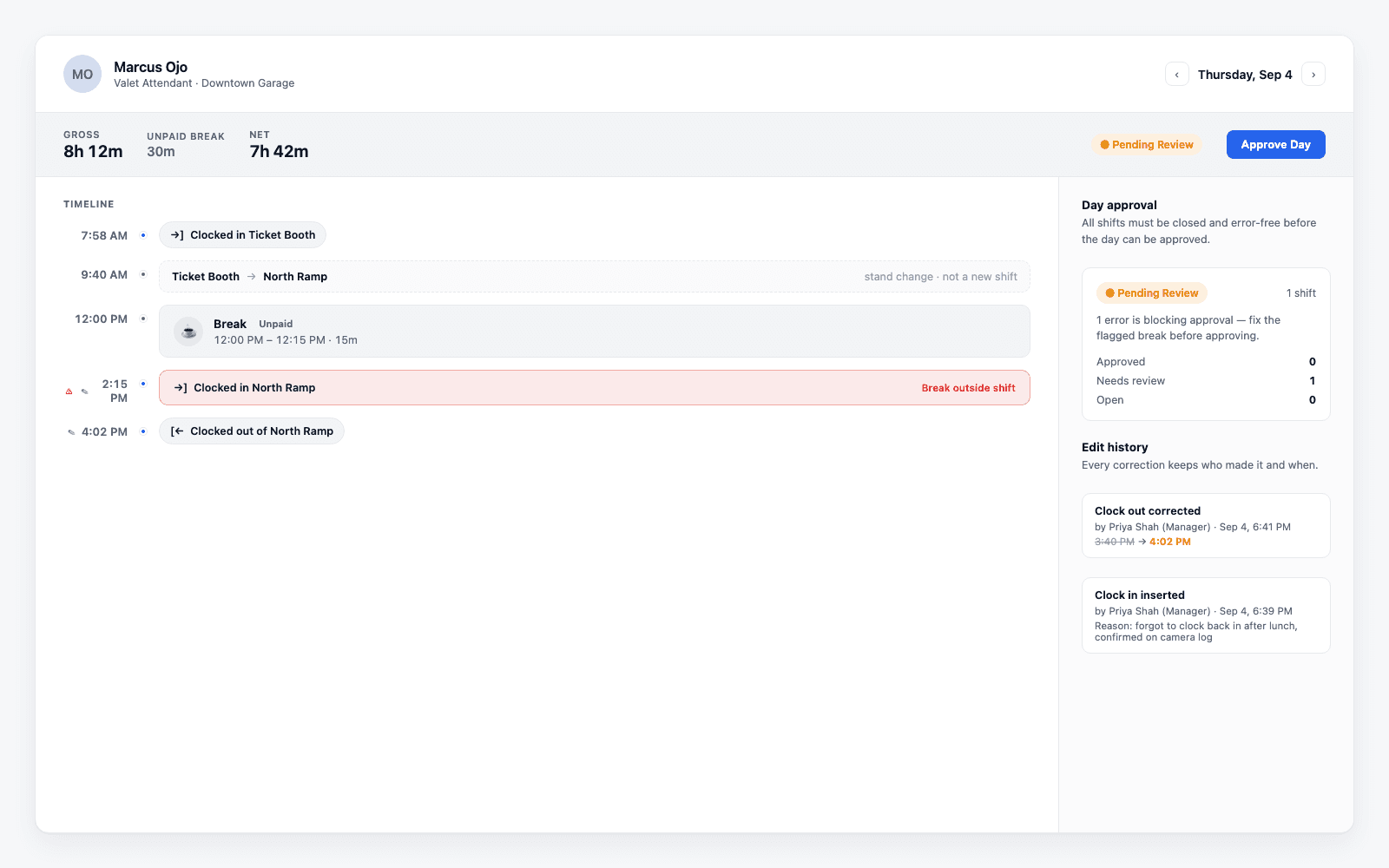
→The gross/net split, the stand-change marker, the flagged error blocking approval, and the edit history rail - all four "must answer" pieces of a real day, in one screen.
Where Valletto changes the math
A timesheet you can hand to a skeptic.
Buddy punching, disputed hours, a GM who doesn't trust the total on the page - the fix isn't a stricter policy, it's a record that shows its work. Every hour on this timesheet traces back to an event, an author, and, if it changed, a reason.
Next: a day's approved timecards feed straight into the pay period - see the Payroll guide for how a period gets locked, and reopened, without losing the trail this drawer keeps. And every punch on this timeline starts at the valet's phone - see the Clock-In guide for how that first event gets created.
