Feature Guide · Layout
The stand is the unit.
The location is where it lives.
Every valet operation is built on two records: a location and its stands. Get the relationship between them right during setup, and rates, reports, and dispatch all just work. Get it backward, and you'll be untangling it for months.
The model
A stand belongs to the company. It just happens to point at a location.
It's tempting to think of a stand as something that lives inside a location - nested under it, like a folder inside a folder. That's not how the data is built, and the distinction matters more than it sounds like it should. A stand is its own record, owned by the company, that carries a reference to the location it operates at. The location doesn't contain its stands; it's pointed to by them.
That single design choice is why a company-wide rates report can pull every stand across every property in one query, why moving a stand's assignment is a one-field edit instead of a data migration, and why the setup checklist can treat "add a location" and "add a stand" as two distinct, sequential steps instead of one compound one.
What it is
Two records, one relationship
Location vs. stand
A location is the property - the hotel, the restaurant, the venue. A stand is a specific place cars get received and returned there.
The property
Location
Name, address, brand image, hours of operation, tax settings, and the contact info that guests see by default. One location can have any number of stands.
The physical spot
Stand
A specific place cars are received - the main entrance, a side valet circle, an event overflow lot. Each stand carries its own pricing plan, dispatch behavior, and optional contact overrides.
The pointer
locationId
The field on every stand that names which location it belongs to. It's the only link between the two records - there's no nesting, no parent-child document structure.
Where it actually lives
companies/{id}/stands
Every stand in a company sits in one flat collection at the company level. A location's "stands" are simply the stands whose locationId matches it - a filter, not a folder.
→Stands live at companies/{companyId}/stands/{standId}, each carrying a locationId field - not nested under companies/{companyId}/locations/{locationId}/stands. A location doesn't hold its stands; it's referenced by them.
Why company-owned, not location-nested
This isn't a modeling detail nobody will ever notice. It's what makes company-wide operations possible without special-casing every one of them.
If stands were nested under locations
The road not taken- A company-wide rates report needs one query per location, then a merge
- Reassigning a stand means moving a document between subcollections
- Dispatch and stand-level lookups always need a locationId in hand first
Stands owned by the company, pointing at a location
How it's built- One flat collection, filterable by locationId - or not filtered at all
- Reassigning a stand is a single field update, not a move
- Company-wide views (rates, staffing, reports) read one collection
→The practical effect: the console's Locations page filters the stand collection by locationId to show you what's under one property, and the Rates page reads the same collection unfiltered to show you everything. Same data, two views.
Setup order
Location, then stand, then rates - in that order, on purpose
The onboarding checklist enforces the sequence
The setup progress screen groups required steps into three outcome-oriented sections: getting paid, messaging guests, and getting the operation itself running. The third section is where locations and stands live, and it's a strict chain.
→Each step depends on the one before it. "Set up a valet stand" is locked until a location exists to attach it to; "Set your pricing" is locked until a stand exists to price. The checklist won't let you configure rates for a stand that isn't there yet.
What the setup progress screen actually tracks
Go-live readiness isn't a vibe - it's five concrete, checkable conditions, and the console shows you exactly which ones are still open.
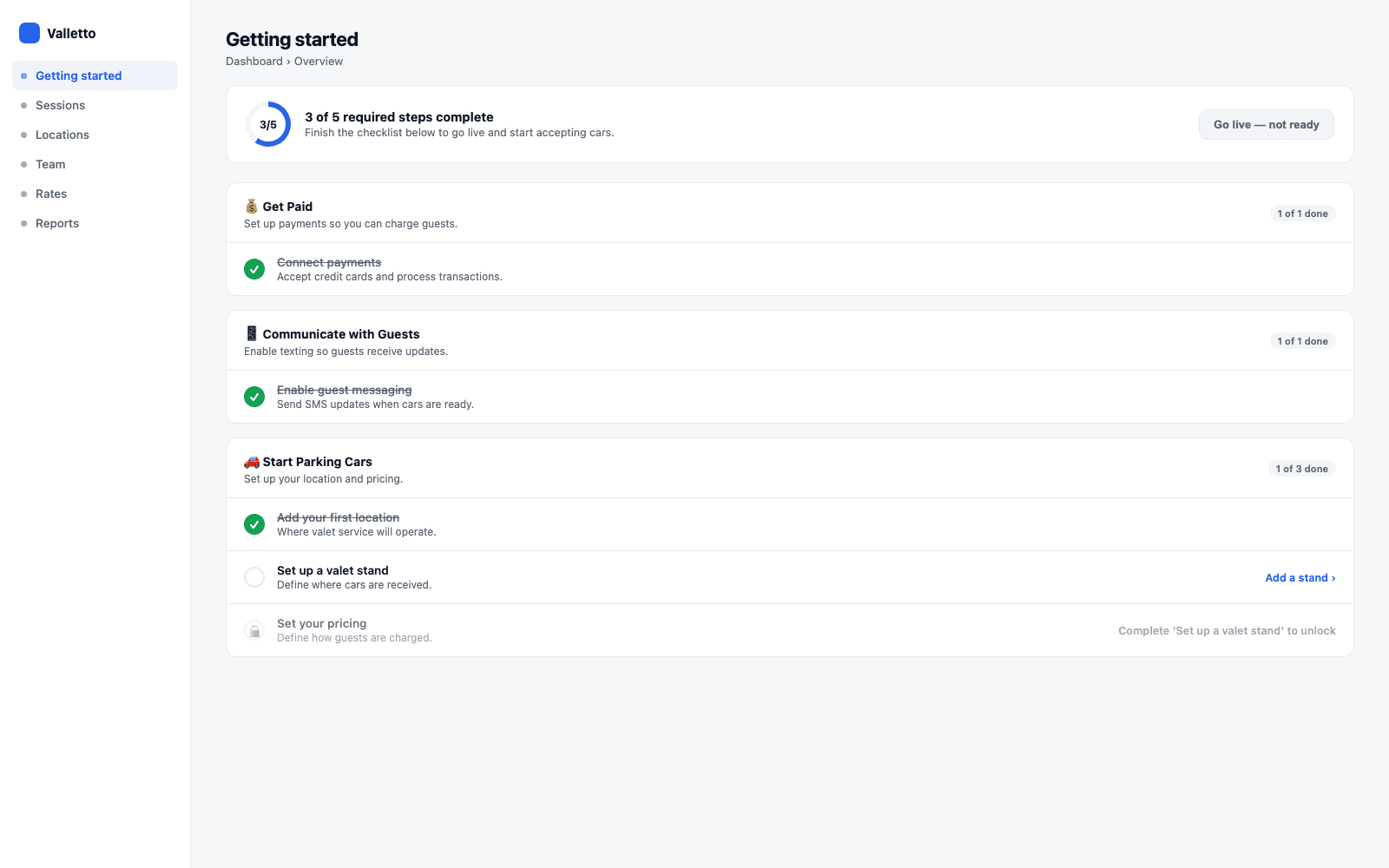
→The progress ring counts required steps only: payments connected, guest messaging enabled, a location added, a stand added, and pricing set. A company is "go-live ready" only once all five are true - the checklist doesn't advance on partial credit.
The daily loop
Adding a stand, and adjusting one later
Adding a stand once the location exists
Once a location is live, adding another stand to it is a small, repeatable action - not a re-run of onboarding.
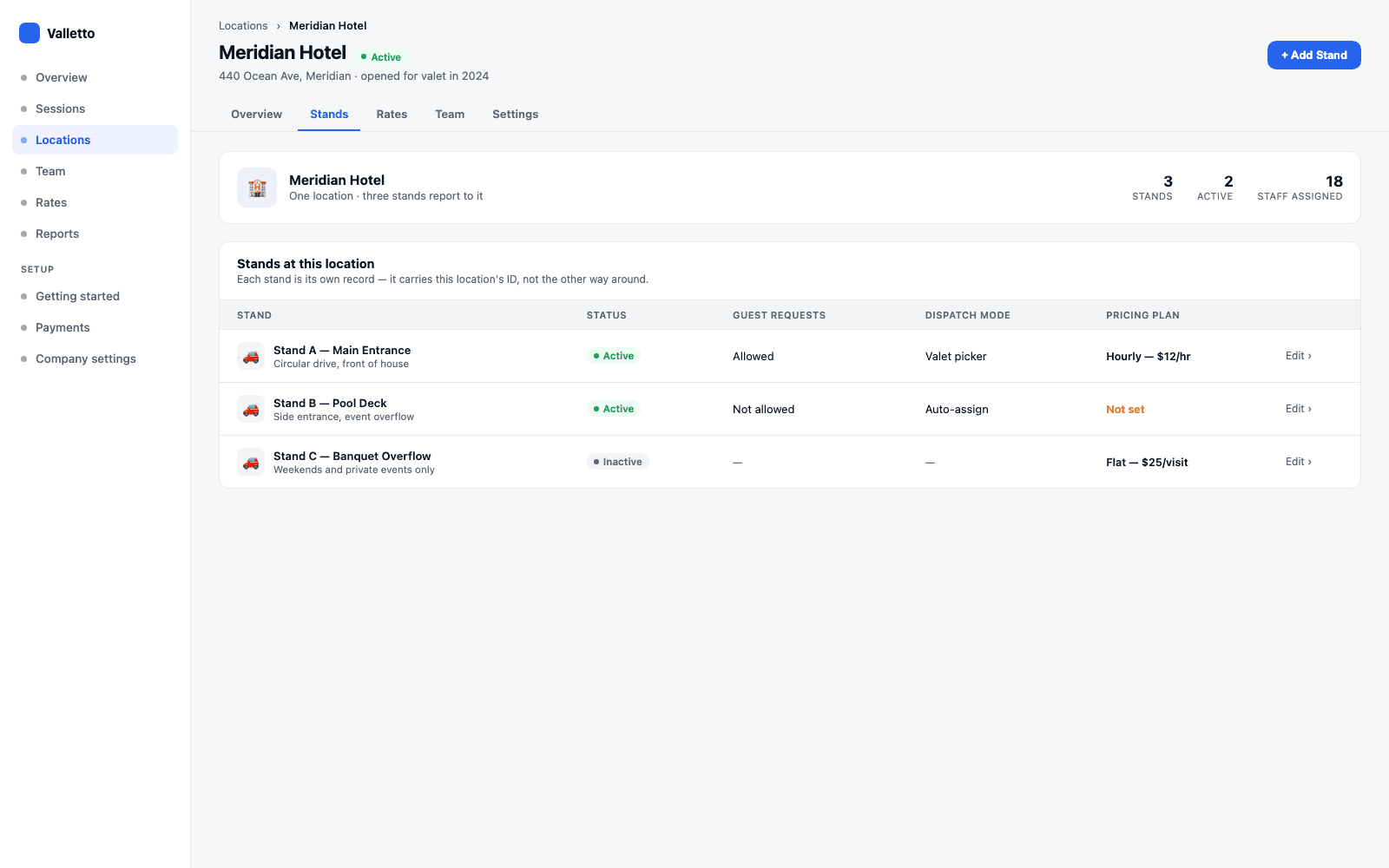
→The Stands table under a location is a live filter over the company's stand collection, not a separate list. Each row is its own document with its own status, dispatch behavior, and pricing plan - independent of its neighbors.
Name and describe it
Basics
A name ("Stand B - Pool Deck") and an optional description staff can use to tell stands apart on a busy shift.
Guest-facing behavior
Requests & dispatch
Whether guests can request their car from this stand, and whether valets pick sessions from a shared pool (dispatch mode) or self-assign.
Money and messaging
Pricing & contact overrides
A pricing plan (hourly, flat, or contracted), and optional stand-level phone, email, website, and legal-page overrides that replace the location's defaults for guests checking in there.
When it matters
Hours & timezone
A stand can run its own hours and carries an IANA timezone identifier, used for pricing calculations at that specific spot.
→None of this requires touching the location record. Adding, editing, or retiring a stand is scoped entirely to that one stand document.
Edge cases
What changing a name breaks - and what it doesn't
Renaming, deactivating, and history
The rule of thumb: identity fields you edit in place are safe to change; the record's existence and its position in history are what history depends on.
Safe to change later
No history impact- Renaming a location or a stand - past sessions and reports keep their own copy of the name at the time
- Deactivating a location - it stays listed, editable, and every past timecard and transaction is untouched
- Adjusting a stand's dispatch mode, request setting, or contact overrides
- Changing a stand's pricing plan going forward
What deactivating actually does
A soft shelving, not a delete- An inactive location refuses new staff clock-ins there, enforced on the server
- It never strands an open shift - clock-out, breaks, and stand switches keep working
- Nothing about history, reports, or payroll changes when a location is deactivated
→There's no separate "archive" state for a stand or location beyond active / inactive - shelving it is the tool for "we're not using this right now," and it's fully reversible.
What it doesn't do
It's a setup and configuration layer, not a floor plan
Deliberately out of scope
This model answers 'where does this car get parked and who's responsible for it' - it doesn't try to answer questions a POS or a floor-plan tool would.
Not a spot map
No garage layout or numbered spaces
A stand is a point of service, not a diagram of parking spaces. Where a specific car physically sits inside a garage is tracked separately, if at all - the stand model doesn't attempt it.
Not a floor-plan tool
No seating, table, or room management
If the location is a restaurant or hotel, its floor plan, table layout, or room inventory lives in whatever system already handles that - this is purely about where valet operates.
Not inventory
No capacity enforcement at the model level
A stand doesn't hard-cap how many cars can be checked in against it just because a capacity number exists somewhere in a display - that's an operational judgment call for staff, not a rule the location/stand model enforces.
→Keep the scope narrow and the model stays simple enough to explain in one sitting - which is the whole point of getting it right during setup.
What it connects to
Once the stand exists, everything else attaches to it
Downstream of the stand
A correctly set-up stand is what makes the rest of the platform coherent - it's the anchor point for pricing and for who's allowed to work there.
Pricing
Rates run per stand
Every pricing plan - hourly, flat, contracted, revenue share - is set on a specific stand, not on the location as a whole. Two stands at the same hotel can charge differently.
Staffing
Roles determine who can touch what
Team members are assigned to locations and clock in at stands; what they're allowed to configure there follows the same role tiers used everywhere else in the console.
→That's a deliberate boundary for this guide: how rates actually get structured is its own piece, and so is how roles and permissions work across the team. This one is just about getting the location and the stand right.
Where Valletto changes the math
Get the stand right, and the rest of setup is fast.
Once a location exists and at least one stand is attached to it, pricing and go-live are a few minutes of configuration - not a redesign. The checklist is built to reflect that: location, then stand, then rates, each one unlocking the next.
The takeaway: a location is the property; a stand is where service actually happens, owned by the company and pointed at its location by a single field. Add the location, add a stand, set its rates, and the operation is live.
