Feature Guide · Staffing
Publishing a week
somebody can plan around
A schedule is a promise with a publication date. The difference between a good and a bad valet employer is mostly how far in advance that promise is made, and how honestly changes are handled after it. Here is how a week actually gets built, published, and covered.
What it is
The schedule is the single record of who is supposed to be where, and it has two states: draft and published.
A manager builds a week against the positions a location actually staffs - a runner at the main entrance, a cashier on the pool deck, a supervisor covering the floor. Every shift starts as a draft: visible to the manager, invisible to the crew, freely movable. Publishing is the one action that changes that. It takes the shifts in the window, checks each person for a double-booking against shifts they already hold anywhere else in the company, and moves the clean ones to published - which is when a valet can see them, plan around them, and be held to them.
That is not a spreadsheet-replacement claim in the abstract. It is what separates a week the crew can trust from a group chat that says "you're probably working Friday" and revises itself twice before Friday arrives.
Who uses it
A manager builds it. A supervisor can act on it. A valet lives inside it.
Three roles, three different jobs
The same board, read differently depending on who is looking at it.
Builds the week
Manager / owner / admin
Drafts shifts against staffing positions, copies last week forward, publishes, and decides open claims and time-off requests from one inbox.
Can act on it
Supervisor
The operational tier - the same one the punch-in door checks server-side. Can approve a claim or decide time off; cannot change what settings the location runs under.
Lives inside it
Valet
Sees only published shifts, at their own location, on their phone. Can offer a shift back, claim an open one, or request time off - never edit the board directly.
→The backend enforces the same tier the schedule UI hides behind a button - hiding a control is UX, not the permission.
The setup order
How a week actually gets built and published
Draft against the staffing, then publish what's clean
A location's stands each carry their own positions and their own week. Nothing here spans stands until a manager decides it should.
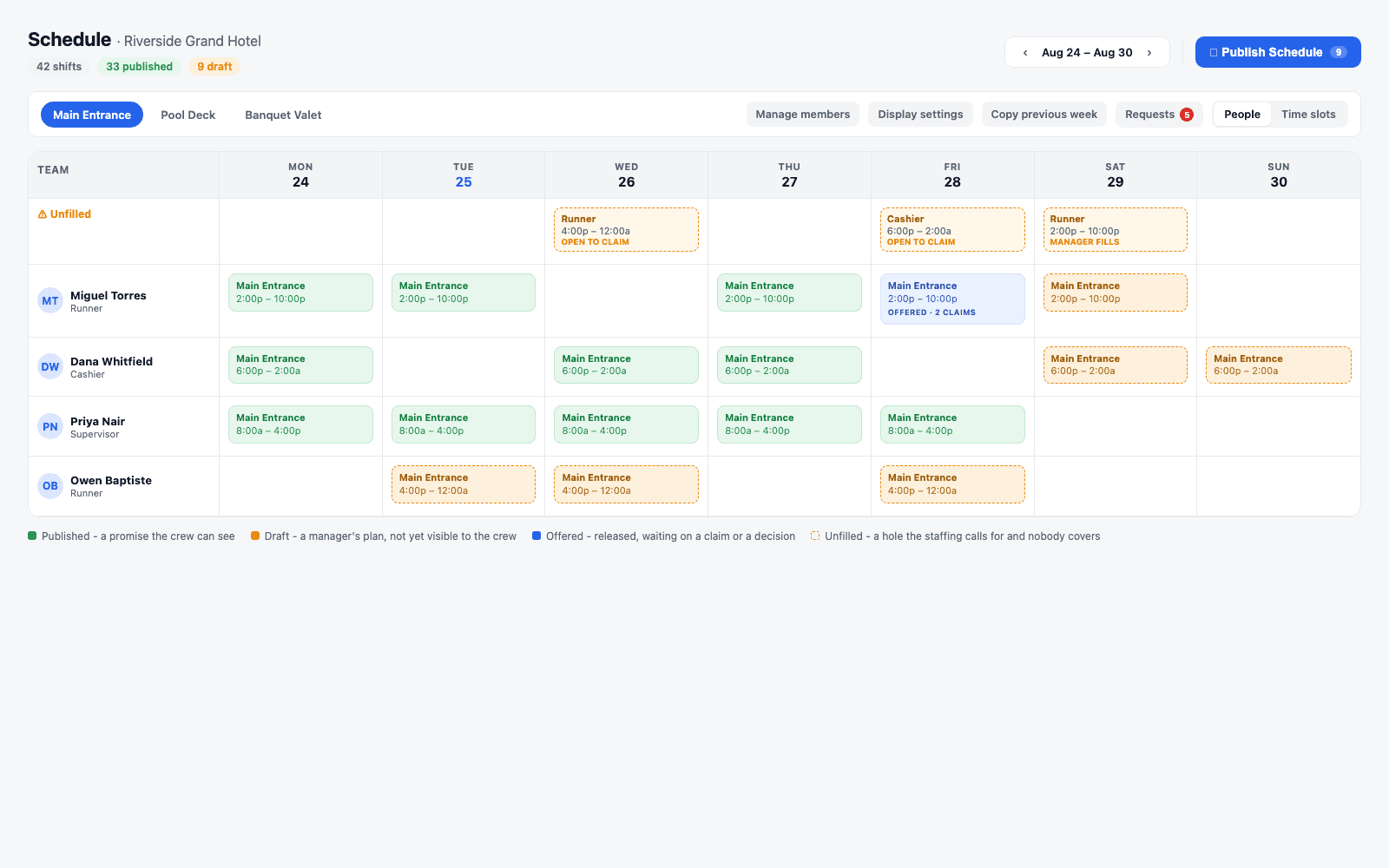
→The Unfilled lane is not a list of documents - it is arithmetic, run live: the stand's staffing for that day, minus the shifts already assigned to it.
A manager picks a stand, drops shifts onto people from templates or from scratch, and can pull last week forward with one action - published shifts only, drafts left out, anyone who's since left the roster dropped and reported by name rather than silently skipped. None of that touches the crew's phones. The board can be rebuilt, reshuffled, and second-guessed all week without a single valet knowing it changed, because a draft is a manager's plan, not yet a promise.
Publishing is the door in between. It runs per member, checks every draft shift in the window against that person's already-published shifts - company-wide, not just at this stand - and publishes the ones that don't collide. A shift that would double-book someone is reported back by name and reason rather than published anyway. The dialog in front of that action shows the manager exactly what they are about to promise: how many shifts, how many hours, and who they belong to, before it goes out.
Coverage is per stand, and a location can run several
A hotel with a main entrance, a pool deck, and a banquet valet runs three boards under one roof - and one roster.
→Who is eligible to pick up a released shift is computed off the location roster, not a stand-scoped field - so the eligible pool is never accidentally empty because of where someone happens to be tagged.
The edge cases
When somebody can't work, the shift goes back into a pool - it doesn't just disappear
Two doors into the same mechanism: offer and release
A valet asking to hand a shift back and a manager approving somebody's time off both land in the same place.
A valet offers their own shift
Voluntary- Gated by a per-location setting a manager controls
- Shown to everyone at that location who is actually free that day
- The shift stays theirs until somebody is approved for it
Approved time off releases it automatically
Absence- Runs the moment time off is approved - nobody has to remember to reoffer
- A shift already underway is reported as unreleasable, never silently dropped
- Never reverses itself - canceling the time off doesn't un-release the shift
→Whoever put a shift up may take it back down on their own; anyone else needs supervisor tier or above to act on somebody else's shift.
Claiming an open shift, and who decides
Eligibility is checked twice - once when the offer goes out, once again the moment somebody taps claim - because the gap between the two is exactly where a conflict shows up.
Who's eligible
Computed, not asked
Works at that location, isn't already the holder, has no overlapping published shift, and has no approved time off covering the window. All five checks are automatic - none is a manager's judgment call.
The default
A claim is a request
Tapping claim asks for the shift. It lands in the manager's Requests inbox alongside time-off requests, as one queue, and stays the current holder's until a manager decides.
The setting
Auto-approve, if the location wants it
A location can turn on first-come, first-served: the first eligible claim changes hands immediately. It never revisits a claim a manager already owes somebody a decision on.
→Unfilled staffing gaps work the same way in reverse: some positions on a template are marked self-service and can be claimed straight off the board; others are the manager's to fill by hand.
What a valet actually sees on their phone
Published shifts for their own location, a date strip, and the two doors into coverage - nothing about drafts, nothing about other locations.
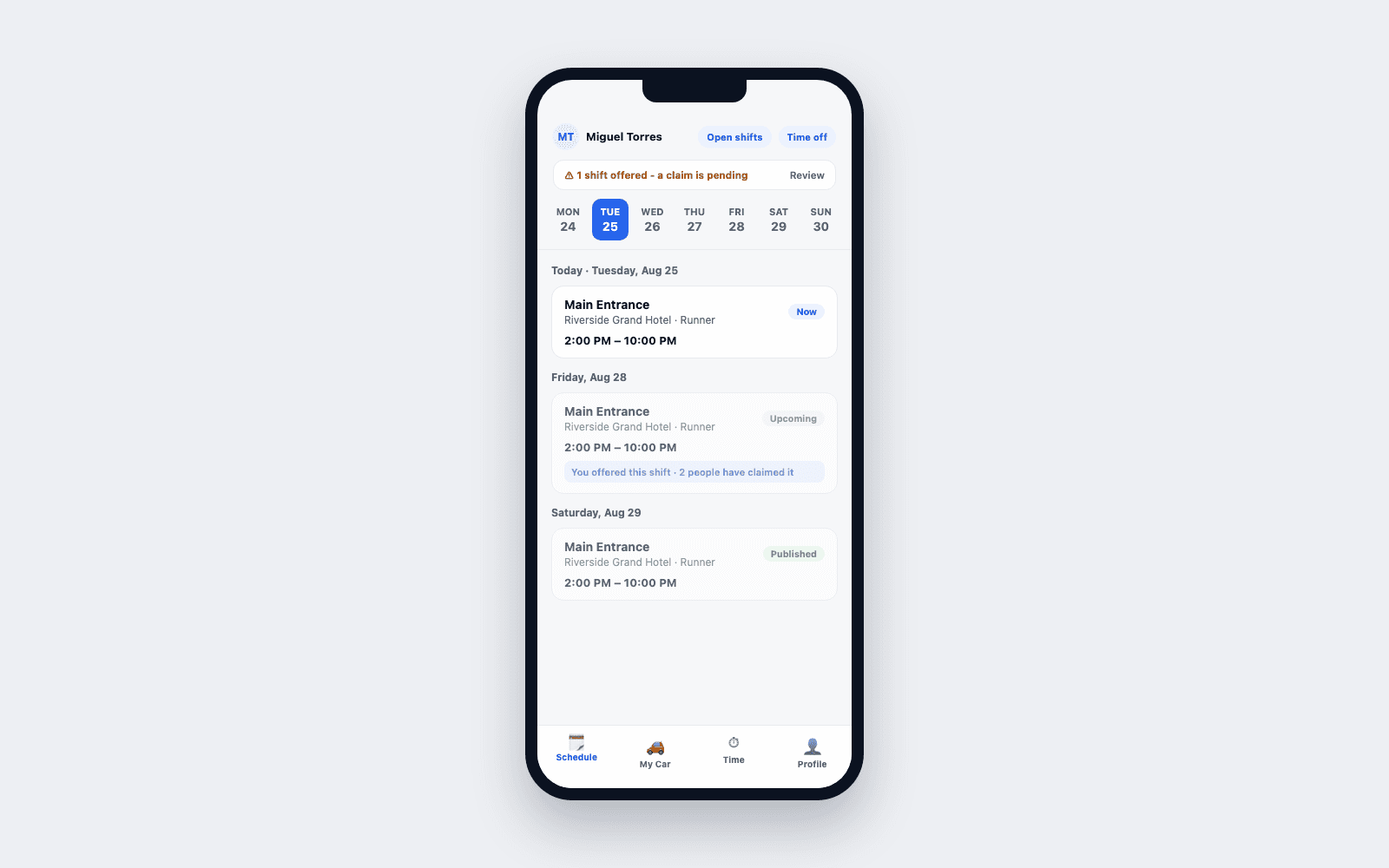
→A shift a valet has offered stays visible to them, marked, with the live claim count - it does not vanish off their phone the moment they hand it up.
Each shift card carries its own status: Now while it's running, Upcoming before it starts, Published once confirmed, and a separate publish-state badge if a manager is still holding it as Draft. From the same screen a valet can open the list of claimable shifts at their location, request time off, and - for a supervisor and above - open the same requests queue the console shows, scoped to the same two decisions: approve or decline.
What it doesn't do
A schedule tool, on purpose, not a payroll system and not a compliance officer
Two boundaries worth stating plainly
Both are deliberate, and both are worth knowing before you evaluate this against a fair-workweek or predictive-scheduling requirement.
Not payroll
Shifts feed time cards - they don't run payroll
A published shift is the plan; what actually gets paid is decided by clock-in and clock-out events, handled separately by time cards. Scheduling doesn't compute pay rates, taxes, or a paycheck.
Not a compliance engine
It surfaces schedule data - it doesn't adjudicate local law
The product records when a shift was published, changed, offered, and reassigned. It does not evaluate any fair-workweek or predictive-scheduling ordinance, and it does not compute predictability pay. Any obligation your jurisdiction imposes is yours to apply - the schedule gives you the timestamps to work from, not the ruling.
→If your operation is subject to a predictive-scheduling law, treat this as a record-keeping tool for that conversation, not as the thing that settles it.
Where Valletto changes the math
A published week is the start of the record, not the end of it.
Once a shift is published, what happens to it next - who clocked in, who covered for whom, who got paid for what - is tracked by the two features this one hands off to: Time Cards, for the actual hours worked against the plan, and the Requests inbox, for every time-off and shift-claim decision a manager made along the way.
Next step: see how a published shift turns into an actual time card - that's Time Cards, the next guide in this series.
