Feature Guide · Requests
Every ask, one queue,
one authority.
A valet texts a supervisor asking for Saturday off. Another asks to pick up an open shift. Both are scheduling decisions - and if they only live in a text thread, there's no record of who asked, who said yes, or why. The Requests inbox is where both land, and where a manager decides them.
What it is
One inbox for two kinds of ask: can't work, and want to work.
Requests is a single queue behind one badge on the schedule. It holds two different questions from your team - a time-off request ("I can't work this day") and a shift claim ("I'd like to pick up this open shift") - because both are the same underlying job: a decision that has to be made by someone with the authority to make it, weighed against hours, and left as a record afterward. They share one drawer instead of living in two separate screens, or worse, in whichever text thread the ask happened to arrive in.
The two are not decided the same way, and the inbox does not pretend they are. Approving time off does not reassign anyone's shift. Approving a shift claim is the one action in the whole flow that actually moves a shift from one person to another - so it is treated as the bigger deal it is.
Who uses it
Supervisors and above, on the web and on the phone
Who is allowed to decide
A person answers, not a policy document. But the door that lets them answer is enforced in exactly one place.
Both request types are decided by a supervisor, manager, admin, or owner - the operational tier of the company, the group with day-to-day authority over the schedule. A valet can ask; a valet cannot decide. Where exactly the line sits for other roles in your company is a company setting, not something this guide reprints - what matters here is the mechanism, not the roster.
The same two request types show up on both surfaces your team actually carries: the web console's Requests drawer, and the equivalent screen in the iOS app. A manager working from a laptop and a manager working from their phone between cars see the same queue, decide with the same two buttons, and produce the same record.
The mechanism
Hiding the button is not the permission. The server is.
The gate lives on the server, not in the interface
This is the part worth being precise about, because it's the difference between a UI convenience and an actual permission.
What the interface does
Convenience- Shows the Approve/Decline buttons only to people who could plausibly use them
- A hidden button is not a locked door - it just means nobody built a way to press it
What actually decides
Authorization- Every decision call is re-checked against the caller's role on the server, independent of what the screen showed
- A call from someone below the required tier is refused outright, with no path around it
→The interface decides what a person sees. The server decides what a person can do. Only one of those is a permission.
Concretely: both decisions - deciding a time-off request and deciding a shift claim - route through their own server-side handler, and each one re-checks the caller's role against a required minimum tier before it does anything else. That check runs on every call, not just the ones that came from a button the interface happened to render. Whether the request arrived from the web console or from the iOS app makes no difference - it is the same server rule either way.
That is also why this is safe to say plainly: a screenshot of the decision buttons, or a description of who sees what, is not the security boundary. Someone could rebuild the button from scratch and the server would still say no. The rule this guide is not going to spell out is the exact tier list for every role in the company - that detail lives in the product, tuned per company, and reprinting it here would only go stale. What matters for this guide is the shape of the rule, and the shape does not change: authorization happens once, in one place, on the server, and everything else is a convenience built on top of it.
Setup order
There's nothing to configure beyond who holds the tier
How a request gets into the inbox
No feature flag, no queue to wire up. A request lands in the inbox because someone made one.
→Setup is about roles, not configuration. Whoever already holds supervisor tier or above already sees the inbox - there is no separate switch to flip.
The inbox is scoped to the whole company, across every location a manager covers - so a manager who oversees two properties is not asked to check two separate queues. Each row names its own location, which is the one thing about a company-wide list a manager cannot otherwise infer just by reading a name.
The daily loop
Working the queue
What a supervisor sees, and what happens on approval
Unanswered requests are the default view. Decided history is one click away, not stacked on top of what still needs attention.
Shift claims first
They can run out of time
An open shift's claim window closes when the shift starts, so claims are shown ahead of time-off requests - the one row type that can expire out from under you.
The hours, up front
Published and draft, never blended
Each row shows the requester's hours for the company that week, so a manager can see at a glance whether approving this pushes someone into overtime - before deciding, not after.
Approve moves the shift
The one irreversible step
Approving a time-off request releases any shifts it overlaps back into the open pool for someone else to pick up. Approving a shift claim reassigns that shift to the winning claimant, and closes every other pending claim on it as declined.
A decline needs a reason
No silent no
Declining either kind of request opens a short note field. The requester sees it. A refusal with nothing attached isn't treated as a finished answer.
Decided requests do not disappear, and they are not the first thing a manager sees either. They collapse into a "Decided" section below the unanswered queue - visible on request, not competing for attention with what still needs a decision. A manager who changes their mind on something already decided gets one confirmation step naming exactly what will change, because reversing a decision that already moved a shift is not the same click as making a fresh one.
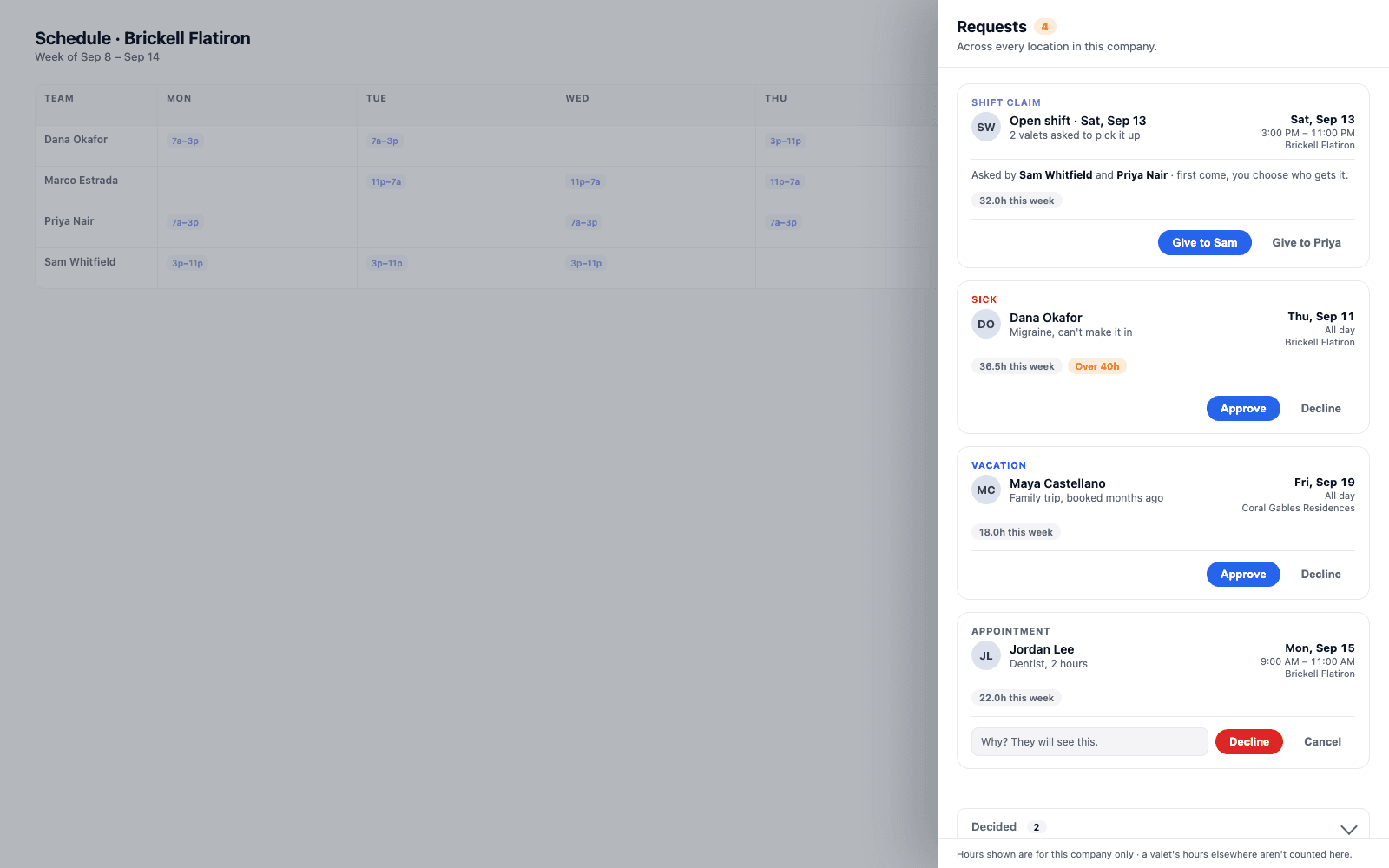
→Shift claims sit above time-off requests because they can expire. Every row carries the requester's company hours for that week, so overtime risk is visible before a decision is made, not discovered after.
Edge cases
What happens when nobody's watching, or two people want the same thing
Two situations worth naming
Neither is hypothetical, and neither is handled by hoping it doesn't happen.
A request with no one to see it
Coverage gap- If a location has nobody at supervisor tier or above scheduled at all, a request can sit genuinely unanswered
- It is not silently dropped - it stays visible in the inbox for whoever next holds the tier, at that location or another the manager covers
A claim on an already-covered shift
Race condition- Approving one claimant closes every other pending claim on the same shift as declined, in one step
- If two managers try to approve two different claimants on the same shift at once, only the first succeeds - the second is refused because the shift already moved
→The second case is enforced the same way the decision gate is: on the server, against the current state of the shift, not against whatever the screen last showed either manager.
What a requester sees
The other side of the queue
Ask, then wait for a real answer
A valet's view of this feature is deliberately small: file the request, then see what happened to it.
From the requester's side, filing a time-off request or claiming an open shift is the whole interaction - there is no queue to watch, no competing claims to see. What comes back is a plain outcome: approved, declined with the reason a manager gave, or - for certain same-day sick requests - already auto-approved, with no manager decision attached because none was needed. A shift claim that loses to another candidate is told exactly that, rather than left to guess why the shift never showed up on their schedule.
What it doesn't do
Two boundaries, on purpose
Not a policy engine, and not a published rulebook
Both omissions are deliberate, not gaps waiting to be filled in a later release.
Not a rulebook
It doesn't publish who can decide what
The full breakdown of which roles can do which things at your company is a setting, tuned per company, and it isn't reprinted in the product's own marketing. What's fixed and worth knowing is the mechanism: authorization happens once, on the server, at a named minimum tier.
Not HR
It doesn't replace time-off policy
The inbox is where a decision gets made and recorded. It has no opinion on how many vacation days someone has earned, whether sick time is paid, or what your policy says about notice periods - that's still your call, made by a person, informed by whatever else you track.
Where Valletto changes the math
One inbox, one authority, one record - instead of a text thread nobody can search.
Requests sits next to the rest of scheduling: the board where shifts get built and covered, and the roles that decide who has authority over them. It doesn't replace either - it's the one place both meet, for the two questions your team actually asks a manager.
Next: see how the shift board itself gets built and covered week to week, and how roles determine who holds supervisor tier and above at each location.
