Feature Guide · Training
Training only works if it's
assigned, tracked, and provable
A new valet does not get curb-ready by watching a senior valet for a week and hoping something sticks. Here's how a packet gets built, who it's assigned to, what a valet actually sees, and what a manager - or a property asking a real question - gets to look at afterward.
The problem with a binder
A signed sheet in a drawer isn't evidence. It's a memory of a conversation.
Most operators already have training content - a safety checklist, a POS walkthrough, a policy on how to handle a damaged vehicle. What they don't have is a system that ties that content to a specific person, on a specific date, with a record of what they actually did. "How are your people trained?" is a question every RFP eventually asks, and a stack of paper acknowledgments doesn't answer it - it just gestures at an answer. Assignment, completion, and evidence need to be the same system, not three separate habits that drift apart the first busy week.
The building blocks
A packet, a course, and an item - three names for the same three layers
Items are the content. Packets are what you assign.
The console's training tool has one content model underneath two names: engineers call the assignable unit a 'course,' the UI calls it a 'training packet.' Same object, either name.
The smallest unit
Content item
A single video, article, checklist, quiz, scenario, PDF, or task. Lives in the content library with a status of draft, published, or archived, and an optional free-text version label.
What gets assigned
Course, shown as 'packet'
An ordered sequence of items (lessons), optionally grouped into modules, with an audience tag (valet, supervisor, manager, and so on), a category, and an estimated total time.
Optional gate
Passing criteria
A packet can require a minimum quiz score, a minimum time spent, or that every item be completed before the packet itself counts as done.
Ready-made starting point
Packet templates
New companies aren't starting from a blank page - seed templates exist for common packets like curb safety and guest vehicle handling, ready to customize.
→A valet never sees the word "course" - the console labels it a packet everywhere it's user-facing. The word switch matters less than the structure underneath it: content items nested inside an ordered packet.
Assignment is who, and it can be broader than one name
A packet or a single item gets assigned to an audience, not just a person - which is what makes onboarding a new hire the same mechanism as rolling out a policy update to everyone at one property.
By role
Every valet, automatically
Assign to the 'valet' role and every current and future valet on the roster is covered - no re-assigning per hire.
By location
One property's rules
A packet scoped to a single location, for a policy or procedure that only applies there.
By team
A specific crew
Assign to a team when the audience is narrower than a whole role or location.
By user
One person
Assign directly to an individual, for a targeted follow-up or a role that doesn't fit a broader group.
→Every assignment carries a due date, a required/optional flag, and a reminder cadence - so a manager sets the rule once and the system chases people, not the other way around.
The daily loop
What a valet sees, and what a manager checks
My Training: one list, sorted by what needs attention
A valet opens My Training and sees exactly their own assigned packets and items - nothing configured for other roles, nothing from other locations.
→Progress on a course is computed from lessons actually completed against the packet's total lesson count - not a self-report. A task-type item can require photo evidence that a manager reviews and approves or rejects before it counts as complete.
Reports: the same data, sliced for a manager or a property
Training Reports is the other side of the same system - every assignment and progress record a company has, viewable by user, by packet, by role, or by location.
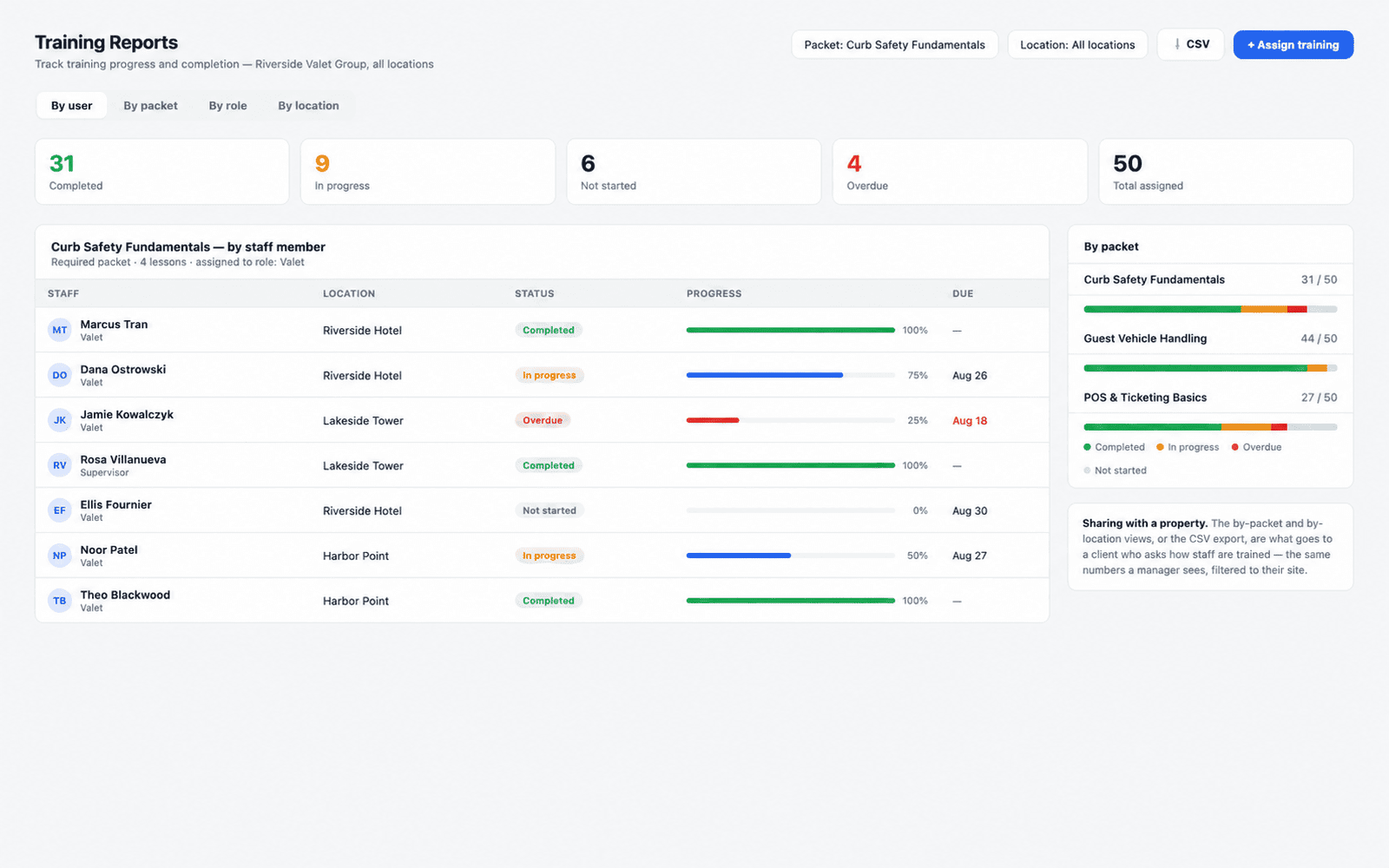
→Illustrative data: fictional staff names, a fictional property portfolio. Status counts across not-started, in-progress, overdue, and completed roll up per person, per packet, per role, or per location, and the whole view exports to CSV.
What a manager checks
Day-to-day- Who's overdue on a required packet, today
- Where a specific new hire is stuck mid-packet
- A task submission waiting on photo review
What goes to a property
The RFP answer- A by-role or by-location completion view, filtered to their site
- A CSV export of the same records, timestamped
- A count, not an anecdote, for 'how are your people trained'
The edge cases
What happens when the ground shifts under a completed assignment
Content changes after someone already finished it
A packet is a live document - items get edited, added, or replaced. That doesn't retroactively touch anyone's existing completion record.
What stays put
A completion record is a record
Progress is tracked per assignment and per target. Editing the underlying content item or packet after the fact does not erase or flag anyone's prior completion.
What doesn't happen automatically
No forced re-take
There is no automatic re-assignment or invalidation when a packet's content changes. A content item does carry an optional free-text version field, but bumping it doesn't itself trigger anything for people who already finished the old version.
The operator's lever
Assign it again, deliberately
If a policy change genuinely requires everyone to see the new material, the fix is the same mechanism as any rollout: create or update the assignment and target the audience again.
→In plain terms: this is a system for proving who completed what and when, not a system that silently re-opens someone's history because a document changed under it. Treat a real policy update as a new assignment.
An assignment nobody finishes
Overdue and not-started aren't hidden states - they're the point of the reminder cadence and the reports view.
Not started
Before the due date- Shows up in My Training with an estimated time to complete
- Counted separately in reports, not folded into 'in progress'
Overdue
Past the due date- Flagged in red in My Training and in the manager's report
- Nothing blocks the valet from working - this is a visibility gap, not an access gate
→An overdue packet doesn't clock someone out or pull them off the floor. It surfaces - loudly, in both places a manager and a valet look - so a human decides what to do about it.
What this deliberately doesn't do
A completion record, not a credential
No certification, no accreditation
→Finishing a packet produces a printable completion record with the person's name, the packet title, and the completion date - useful as internal proof of who did what, when. It is not an external certification and it is not an accreditation from any body. If a property or an insurer needs a specific third-party credential, that's a separate conversation from what this tool produces.
Where Valletto changes the math
Assignment, the daily loop, and the report are the same data - which is the whole point.
A new valet's first week runs through My Training the same way a policy rollout runs through Reports: one assignment layer, one progress record per person, one place a manager or a property looks to find out what actually happened.
Next: training is assigned by role and location - the same audience model that governs who's on the roster and who can act where. See how Team & Roles defines those roles, and how Locations & Stands scopes them to a property.
